


Toucan Smart Home
4.5931.00 Reviews
App Specs
- Version
- 3.3.2 (Build512)
- Updated On
- License
- Free
- Downloads
- 100,000+
- Developer
- VuPoint Solutions Inc.
- Categories
- Lifestyle
- Platform
- Android
Screenshots
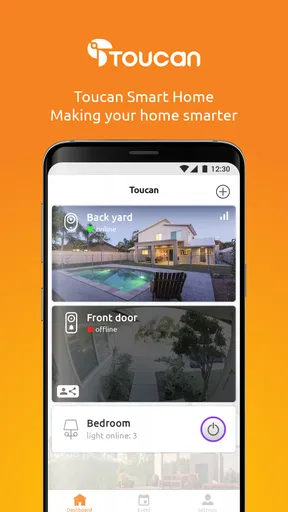
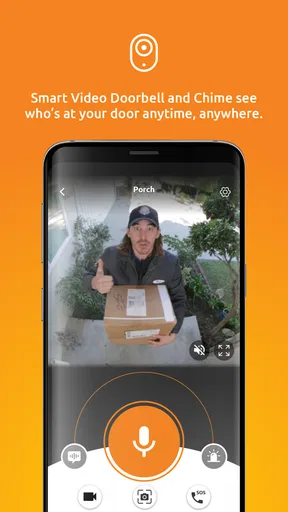
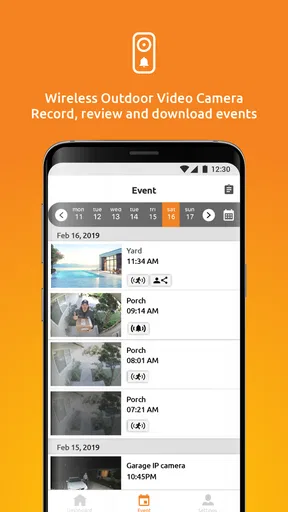
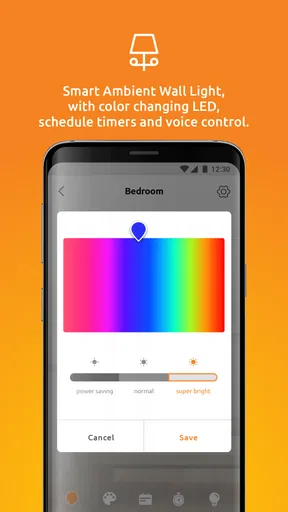
 Analysis by AppCompare
So, I’ve been dabbling with the Toucan Smart Home app for a bit, and I’ve got to say, it’s been quite the ride! If you’re into making your home smarter and more connected, this app is definitely worth checking out. Let me walk you through my experience with it.
Getting Started with Toucan Smart Home
First off, installing the Toucan Smart Home app was a breeze. Whether you’re team Android or iOS, you can grab it from your respective app store. Once downloaded, setting it up was straightforward. You just need to create an account, and voilà! You’re ready to connect your devices.
The app interface is super user-friendly. It’s got this clean design that doesn’t overwhelm you with too many options at once. I really appreciated how intuitive everything felt. Even if you’re not tech-savvy, you’ll find your way around without much hassle.
Features That Stand Out
One of the coolest things I found about the app is how it seamlessly connects with various smart devices. From cameras to lights, the integration is smooth as butter. I tested it with a few smart bulbs and a security camera, and the synchronization was spot on.
Another feature that I loved is the customizable notifications. You can set alerts for specific actions or events, which is super handy. For instance, if you want to know when someone’s at your door, the app will ping you right away.
The app also boasts a scheduling feature. You can set your devices to turn on or off at specific times. I scheduled my lights to dim at night and brighten in the morning, which was perfect for lazy weekends.
Performance and Reliability
Now, let’s talk about how the app performs. During my time with it, I didn’t encounter any major hiccups. It’s quite stable and doesn’t crash unexpectedly, which is always a plus in my book.
Worth Reading Before You Choose

Flipboard Shows What News Apps Must Do Beyond the Feed

Switching to Android Auto Means Rethinking Your Driving Routine

Google Calendar Makes a Crowded Week Easier to Manage

Ludo King Makes the Most of the Minutes Between Plans

Baby Panda World Brings Quick Play to Modern Phones, but Its Game Library Feels Busy

ESPN’s Live Game View Makes Following Close Games Easier
Connection speed is crucial for any smart home app, and Toucan doesn’t disappoint. The response time when controlling devices is swift, and there’s minimal lag. This is especially important for security devices like cameras, where you need real-time feedback.
Security and Privacy
In today’s world, security is a big concern, and I was glad to see that Toucan takes it seriously. The app uses encryption to protect your data, and there are options to manage permissions for each connected device.
You can also enable two-factor authentication for an added layer of security, which is something I always recommend. It’s great to see that they’re prioritizing user safety.
Things to Keep in Mind
While the app is pretty solid, there are a few things to be aware of. The initial setup can take a bit of time, especially if you have multiple devices to connect. Patience is key here!
Also, while most of the app is free to use, there are some premium features that require a subscription. It’s not a deal-breaker, but something to consider if you’re planning to go all-in with your smart home setup.
Final Thoughts
Overall, I’ve really enjoyed using the Toucan Smart Home app. It’s reliable, user-friendly, and packed with features that make managing your smart home a breeze. Whether you’re a smart home veteran or a newbie, it’s definitely worth a try.
If you’re looking to up your home automation game, this app could be your new best friend. So go ahead, give it a whirl and see how it transforms the way you interact with your home!
Pros
- User-friendly interface for easy navigation.
- Seamless integration with multiple devices.
- Customizable automation settings.
- Real-time notifications for quick alerts.
- Energy-saving features included.
Cons
- Limited support for older devices.
- Occasional connectivity issues reported.
- Subscription required for premium features.
- Initial setup can be time-consuming.
- Limited third-party app compatibility.
FAQs for Toucan Smart Home
What is the Toucan Smart Home app used for?
The Toucan Smart Home app is designed to provide users with a seamless way to manage and control their smart home devices remotely. It allows integration with various smart products such as cameras, lights, and alarms, offering real-time monitoring, notifications, and automation features for enhanced home security and convenience.
How do I set up devices with the Toucan Smart Home app?
Setting up devices with the Toucan Smart Home app is straightforward. First, download the app from the App Store or Google Play. Once installed, create an account and follow the in-app instructions to add new devices. Ensure your phone is connected to Wi-Fi and the devices are powered on during setup.
Is the Toucan Smart Home app compatible with all smart devices?
The Toucan Smart Home app is compatible with a wide range of smart devices, particularly those from the Toucan brand. However, compatibility with third-party devices may vary. It's important to check the app’s device compatibility list or the product description to ensure your devices can be integrated smoothly.
What security features does the Toucan Smart Home app offer?
The Toucan Smart Home app provides robust security features, including end-to-end encryption for data protection and secure cloud storage for recorded footage. Users can also set up motion detection alerts, customize notification settings, and access real-time video feeds to keep their homes safe and secure.
Are there any subscription fees associated with the Toucan Smart Home app?
The Toucan Smart Home app itself is free to download and use. However, some advanced features, such as extended cloud storage for video recordings or premium device integrations, may require a subscription. It's advisable to review the app’s pricing plans for detailed information on any additional costs.


